


Cool VPN Pro: Secure VPN Proxy
4.711.33K Reviews
App Specs
- Version
- 1.0.443
- Updated On
- License
- Free
- Downloads
- 50,000,000+
- Developer
- coolvpn pro
- Categories
- Tools
- Platform
- Android
Screenshots

 Analysis by AppCompare
I judge a VPN by how naturally it fits into an ordinary day, not just by how quickly it connects once. Cool VPN Pro: Secure VPN Proxy is a free tools app from coolvpn pro, aimed at people who want a straightforward way to route everyday browsing, chats, video, and gaming through a VPN. Its simple starting point is appealing, but I’d still treat it as one part of a sensible privacy routine rather than a magic shield for everything I do online.
A repeatable routine for everyday connections
My preferred way to use a simple VPN is to make connecting a deliberate habit: open the app before a task where I want the extra layer, connect, and check that the connection is active before continuing. That sequence is more useful than tapping through quickly and assuming protection is on. It also helps avoid the common mistake of starting a sensitive session first and remembering the VPN afterward.
For example, imagine I arrive at a café, join its Wi-Fi, and need to answer messages while checking a travel booking. I would connect through Cool VPN Pro before opening those apps, then keep the VPN on while I finish. If the connection drops or I switch networks, I’d pause anything private until I can see that the VPN is active again. That small pause is a practical habit, not a special feature the app needs to promise.
What the simple setup does—and does not—settle
The app’s one-tap approach makes it less intimidating than VPN services that ask new users to compare protocols, configure individual connections, or study a long settings panel before they can begin. That simplicity suits occasional use and people who mainly want a quick connection for a chat, a video session, or a game. It is also easier to build into a routine when the alternative is skipping protection because setup feels like work.
Still, a connected VPN does not make every online action private. It changes how traffic is routed, but it cannot stop someone from handing over account details on a fake sign-in page, protect a weak password, or make a suspicious download safe. I’d keep normal precautions in place: use trusted apps, check site addresses before signing in, and avoid sharing sensitive information just because the VPN indicator is on.
Settings and choices worth checking
When I install any VPN, I take a moment to look through the available connection and privacy options instead of assuming the default is ideal for every situation. In Cool VPN Pro, the clear interface is a good starting point, but I would still check what server or connection choice is active before a particular task. A nearby option is often a sensible first try for routine browsing, while a different location may be relevant when a service itself requires it. I would not choose a distant location just because it sounds more private; extra distance can make a connection less convenient.
I also make a point of checking whether the VPN is still connected after moving between Wi-Fi and mobile data. That is a useful repeatable check on any phone, especially if I am heading out of the house and expect to keep using the same app. If uninterrupted coverage matters for a task, I’d test my normal route in advance rather than discovering a connection change in the middle of a call or game.
Worth Reading Before You Choose

EA SPORTS FC Mobile 26 Is a Bigger Football Game, but It Takes Time

Flipboard Shows What News Apps Must Do Beyond the Feed

Switching to Android Auto Means Rethinking Your Driving Routine

Google Calendar Makes a Crowded Week Easier to Manage

Ludo King Makes the Most of the Minutes Between Plans

Baby Panda World Brings Quick Play to Modern Phones, but Its Game Library Feels Busy
Where speed and convenience involve trade-offs
Cool VPN Pro is presented for video and gaming as well as chat, which makes it relevant to more than quiet web browsing. In practice, those uses place different demands on a VPN. A video session can tolerate a little delay more easily than a fast-paced online game, where even a small change in responsiveness may be noticeable. I’d try the connection with the specific app I plan to use, at the time and place I normally use it, instead of assuming one good browsing session tells me how every activity will feel.
Free access lowers the barrier to trying the service, but the app also offers in-app purchases, with items priced from $0.99 to $94.99. I’d check the purchase details in the app before committing and decide whether the free experience already covers my needs. A VPN is not automatically better value just because it advertises more options; what matters is whether its actual connection behavior suits my routine and whether I understand the ongoing cost of anything I choose to buy.
People who need a carefully documented privacy service for work, regulated information, or a high-risk situation should compare providers on independently verifiable policies and technical details before relying on one. A simple interface is convenient, but it is not a substitute for evidence when the stakes are high. For those cases, I’d favor a service that clearly explains its privacy practices and gives me the specific controls my organization requires.
Cool VPN Pro has a 4.7 average from around 800,000 ratings, and it has been installed over 50 million times. Those figures suggest many people have tried it, but popularity cannot tell me whether its privacy approach fits my own threat model. I’d use community feedback as one point of context, then make my decision based on my needs, the app’s behavior on my device, and the level of transparency I expect from a VPN.
Getting Started with Cool VPN Pro
First off, installing Cool VPN Pro: Secure VPN Proxy was super easy. Just a quick search in the app store, a couple of taps, and I was ready to roll. The interface is sleek and straightforward, which makes it really user-friendly. You don’t have to be a tech wizard to navigate through the app. Trust me, if I can do it, anyone can!
Features That Stand Out
What really caught my attention were the app's features. It's packed with a bunch of cool tools to make sure you’re surfing the net safely. Here’s what stood out to me:
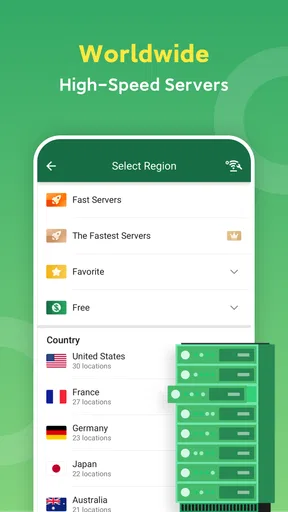
- High-Speed Servers: It’s all about speed these days. Whether I was streaming or just browsing, the connection remained lightning fast.
- No-Log Policy: Privacy is key, and this app ensures that your data isn’t stored or shared. It’s as private as a VPN gets.
- Global Servers: With servers all over the world, you can easily access content from different regions. It’s like having the world at your fingertips!
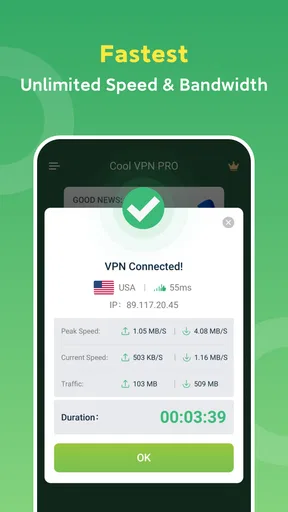
- Easy One-Tap Connect: No complex setups here. Just one tap, and you’re connected to the VPN. Simple!
User Experience
In terms of user experience, Cool VPN Pro really nails it. The app runs smoothly without any hiccups. I didn’t experience any sudden disconnections, which is always a plus. Plus, the design is easy on the eyes – nothing too flashy, just clean and functional.
One thing I noticed was how intuitive the app is. Even if you’ve never used a VPN before, the app guides you through everything. From choosing a server to understanding the security features, it’s all laid out clearly.
Security and Privacy
Now, let’s talk security. After all, that’s why we’re here. Cool VPN Pro uses top-notch encryption to keep your data secure. Whether you’re connected to public Wi-Fi or your home network, you can browse without worrying about prying eyes.
The app’s no-log policy is a major win for privacy advocates. Your data isn’t tracked, which means you can browse with peace of mind. It’s comforting to know that your online footprint remains private.
Final Thoughts
Overall, I’ve really enjoyed using Cool VPN Pro: Secure VPN Proxy. It does exactly what it promises without any fuss. The combination of speed, security, and ease of use makes it a great choice for anyone looking to protect their online activities.
If you’re in the market for a reliable VPN, I’d definitely recommend giving this one a shot. You can find the download link on our website, so why not check it out today? After all, a little extra security never hurt anyone!
Who I’d recommend it to
I can see Cool VPN Pro working best for someone who wants an uncomplicated VPN for occasional public Wi-Fi use, casual browsing, messaging, or trying a VPN with video and games. Its Everyone age rating and support for Android 6.0 and later make it accessible to a broad range of Android users. The current version is 1.0.429, so I’d keep the app updated through the usual store process rather than relying on an old installation.
I’d be more cautious if I needed a VPN for demanding work, highly sensitive research, or a household where several people depend on one carefully managed setup. In those situations, I would compare the service with established paid alternatives that explain their privacy practices and offer controls suited to that need. For a first-time user, though, a low-friction connection can be a useful way to learn when a VPN helps and when ordinary account security matters more.
How it fits beside other VPN choices
Compared with a built-in browser privacy mode, a VPN is intended to route more of a device’s internet traffic, rather than simply changing how one browser handles a session. Compared with a manually configured VPN, Cool VPN Pro’s appeal is ease: I don’t have to begin by entering connection details. The trade-off is that people who want fine-grained control may prefer a service that clearly lays out its technical options and lets them make more deliberate choices.
I would also separate a VPN from ad blockers and password managers. They solve different problems, so replacing one with another is not a fair comparison. A VPN can be part of a safer routine on shared networks; a password manager helps me avoid reused passwords, while a reputable ad blocker can reduce unwanted page elements. If I were choosing only one tool for a specific risk, I’d identify that risk first instead of expecting a VPN to cover everything.
Small habits that make the app more useful
One practical tip is to decide in advance which activities deserve a VPN connection. I might use it routinely on unfamiliar Wi-Fi, but leave it off when a service I trust works better without it or when a connection issue interrupts an important task. That is not a reason to abandon it; it is a reminder to make the choice based on what I’m doing, rather than treating “always on” as the only sensible setting.
For repeated use, I’d keep the workflow simple: connect before opening the apps that matter, verify the connection, and recheck after changing networks. If video buffers or a game feels less responsive, I’d compare the experience with the VPN disconnected on a trusted network, then try a more suitable server choice if the app allows it. That kind of controlled comparison helps identify whether the VPN is the cause, without guessing from one bad session.
My overall view is that Cool VPN Pro is most convincing as an approachable, free starting point for everyday VPN use, not as a promise of complete anonymity or a universal fix for every security concern. I’d recommend trying it if ease matters more to you than extensive configuration, while checking the purchase options before buying anything. If you need strong assurance about privacy practices or specialized controls, compare alternatives carefully first; if you simply want a convenient tool to add to sensible online habits, this app is an accessible option.
Pros
- Fast connection speeds for seamless browsing.
- Simple
- user-friendly interface.
- Supports multiple devices simultaneously.
- Wide range of global server locations.
- No ads for an uninterrupted experience.
Cons
- Limited free version features.
- Occasional server disconnections.
- No dedicated support chat option.
- Some servers can be slow at peak times.
- Lacks advanced customization settings.
FAQs for Cool VPN Pro: Secure VPN Proxy
What platforms is Cool VPN Pro available on?
Cool VPN Pro is available for both Android and iOS devices. This ensures that users across different mobile platforms can enjoy secure and private browsing. Simply visit the Google Play Store for Android or the App Store for iOS to download and install the application.
How does Cool VPN Pro ensure my online privacy?
Cool VPN Pro uses advanced encryption protocols to secure your internet connection, making it difficult for hackers or third parties to access your data. It masks your IP address, allowing you to browse anonymously and protect your personal information from potential threats.
Is Cool VPN Pro free to use?
Cool VPN Pro offers both free and premium versions. The free version provides basic features with limited server access, while the premium version unlocks additional servers, faster speeds, and enhanced security features. Users can choose the plan that best fits their needs.
Can I use Cool VPN Pro to access geo-restricted content?
Yes, Cool VPN Pro allows you to bypass geo-restrictions by connecting to servers in different countries. This enables you to access websites and content that might be unavailable in your region, expanding your browsing and streaming options.
What should I do if Cool VPN Pro is not connecting?
If you encounter connection issues with Cool VPN Pro, try restarting the app or your device. Ensure that your internet connection is stable. If the problem persists, check for app updates or contact customer support for further assistance to resolve the issue.


